Logmaster Logo
DriverRecord KeeperBusiness OwnerProductsIntegrationsTraining and GuidesAbout UsFind Providers

Heavy vehicle logbook app and transport compliance system built for advanced fatigue management

Logmaster includes AFM among its NHVR fatigue plans, so drivers on an existing AFM accreditation can keep logging accurately in the one app.
Ask For InfoBook a Demo
Man working on Logmaster app

TRUSTED BY MORE THAN 10,000 DRIVERS

logmaster supplychainpartners
HHTS logo
AfMA logo
logo
transport 1
HVIA logo

What Is Advanced Fatigue Management (AFM)?

Advanced Fatigue Management (AFM) was an accreditation module under the National Heavy Vehicle Accreditation Scheme (NHVAS) that allowed operators to work outside Standard Hours and Basic Fatigue Management (BFM), provided fatigue risks were effectively managed.

From 1 August 2026, Alternative Compliance Accreditation for Fatigue (ACA-Fatigue) replaced AFM and BFM for new applicants under the Heavy Vehicle Accreditation (HVA) scheme. Operators must hold General Safety Accreditation (GSA) to apply for ACA-Fatigue.

Existing AFM accreditations remain valid until they expire or are cancelled, or until the operator transitions to the HVA scheme. The work and rest limits for AFM drivers are set out on the operator's AFM accreditation certificate.
Logmaster web portal open on a laptop

Why AFM Drivers Log with Logmaster

Logmaster makes working under AFM simpler, with guided entries and a clean record at every check.
Minute-by-minute logging icon

Every AFM minute counted

AFM limits leave little room to give time away, so Logmaster logs the exact minute instead of rounding each entry up to a quarter hour.
Less paperwork icon

Fewer pages to fill in

Guided entries take the place of handwritten pages, and a new entry can still be corrected right up to your End of Day sign-off.
Fatigue breach alert icon

Breaks, on time

Rest reminders and a live count of time left keep you inside the limits on your AFM certificate.
Offline mode icon

Built for remote routes

AFM work often means long runs through country with no coverage. Logmaster keeps logging offline, holds every entry on the phone or tablet and sends the lot to the office once a signal comes back, with nothing to type twice.
Drivers icon

Shaped by working drivers

Feedback from drivers on long AFM shifts shaped the app, so it asks for what the diary needs and little else. Drivers who work for more than one company can keep the one app across every job.

What the Office Gets

With Logmaster, AFM records are visible to the office in real time, so you can plan and intervene early.

Live visibility

Each AFM driver's entries reach the web portal the moment they're saved, showing who is on a work period, who is resting and whose limit is coming up.

Simpler record keeping

Weekly log sheets come in without anyone chasing diaries, and every AFM record is filed in the web portal for the next audit.

Stay ahead of breaches

Time-stamped records and early alerts give you evidence of the reasonable steps taken to manage fatigue risk under AFM.

Better planning

Give each run to a driver whose AFM hours can cover it, and the schedule holds together.

Drivers get going fast

Plain screens and a support team on hand mean drivers new to AFM can make their first entries without guesswork.

Your phone or a fitted tablet

It runs on Android 7+ and iOS 12.5.5+ devices, and tablets and truck mounts can be supplied if you want fixed hardware.

Electronic Work Diary vs Paper Logbook

AFM logging on paper and in the app.
Electronic Work Diary
Paper Logbook
One minute accuracy
Fifteen minute blocks
Automatic syncing
Manual entries
Easy to read and access
Handwriting varies
Real time operator visibility
No live oversight
Secure cloud storage
Can be lost or damaged
Faster audits and reporting
Time consuming
A digital AFM record is legible at every check and can't go missing from the cab.
Book a Demo

Moving Your AFM Drivers Across

Moving AFM drivers off paper takes a few steps.
Step 1

Install the app

Download Logmaster from the App Store or Google Play and fill in your driver profile.
Step 2

Checks and declarations

Before the first work period, finish the pre-start check and fitness declaration in the app, along with any custom forms your operator uses.
Step 3

Log as you go

A couple of taps starts a work or rest period, and the time is captured to the exact minute against your AFM limits.
Step 4

Automatic syncing

Each entry is kept on the device and sent to the cloud when coverage returns, so a dead zone never costs you a record.
Step 5

Operator dashboard

In the web portal, record keepers watch the live status of AFM drivers, review logs and keep track of compliance.
Step 6

Audit-ready exports

When an AFM audit is due or a driver's week needs checking, logs and reports export in a few clicks.

Everything in One App

1. Accurate one minute recording
2. Offline functionality for uninterrupted use
3. Live visibility for fleet managers
4. Fatigue reminders and breach alerts
5. Driver declarations and vehicle checks
6. Secure cloud storage
7. Multi company support for contractors
8. Fast export for audits and reporting
9. Fatigue rule sets including Standard Hours, BFM, AFM, WA plans and bus rules
Book a Demo
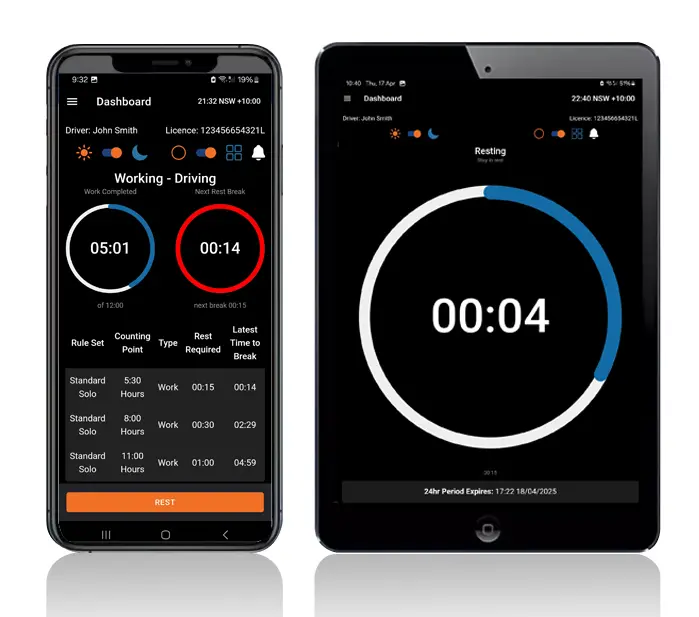
Logmaster app on a phone and tablet

Who Uses Logmaster

From the cab to the compliance desk, every role in an AFM operation has a use for it.
User Type
Benefit
Truck drivers
Easier logging and clear alerts
Transport operators
Real time visibility and compliance
Compliance managers
Reliable logs for inspections
Owner drivers
No paperwork and simple routines
Subcontractors
Easy switching between employers
Drivers, schedulers and the compliance team all read from one set of AFM records, so nobody works from an old copy.

Why AFM Operators Choose Logmaster

More than 1,200 transport businesses and over 10,000 drivers use Logmaster, supported by more than 80 channel partners. PFD Food Services, Cleanaway and Greyhound Australia are among the operators running their work diaries on it. For an AFM operator the draw is simple: AFM sits in the app beside Standard Hours and BFM, so a mixed fleet keeps one diary while the business plans its move to ACA-Fatigue.
Book a Demo
Logmaster dashboard on a desktop screen

Reviews from the Cab and the Office

Ray A.

First day with Logmaster was to my surprise was user friendly. Josh was very thorough in taking me through all the steps in setting up the Logmaster app. I would recommend Logmaster to all drivers regardless of age. Never have to worry about making a mistake as it tells you if you are. Great customer service after hours support is second to none.

Mike H.

Have started using Logmaster after trying 3 other models. I actually enjoy using it. Very easy to use and follow and the help if you need it is top notch by the developer. Does everything by the minute and works when no service is available. My system is customised for me and fits well with my system (I’m WA). Cost is on par with two of the other ones looked at.

Frequently Asked Questions

See Logmaster in Action

Book a demo to see AFM work and rest logged to the minute, with the office watching live. Logmaster is an NHVR approved app that also covers Standard Hours and existing BFM accreditations.

Book a Demo

Download / Updating the app

Get it on Google PlayDownload on the App Store

Support

TRAINING CENTREFREQUENT QUESTIONSPRICING INFORMATION

Resources

Work & Rest RulesFor AuditorsFAQDownload Transport Compliance System BrochureArticles & MediaReseller ResourcesNHVR CertificationISO 27001 CertificationReleasesInvestorsBranded Device BackgroundsJoin Mailing List

Contact us

Level 1/63-73 Ann St, Surry Hills NSW 2010

New Enquiries
(02) 7228 6269
Support and Training
(02) 7228 6266
[email protected]LogmasterISO/IEC 27001 certified