Logmaster Logo
DriverRecord KeeperBusiness OwnerProductsIntegrationsTraining and GuidesAbout UsFind Providers

Electronic Work Diaries in Australia: Managing the Move From Paper

More Australian operators are swapping the written diary for an NHVR approved EWD. The technology is the easy part. This page looks at why fleets make the move and how to bring drivers with you.
Ask For InfoBook a Demo
Man working on Logmaster app

TRUSTED BY MORE THAN 10,000 DRIVERS

logmaster supplychainpartners
HHTS logo
AfMA logo
logo
transport 1
HVIA logo

Why Fleets Are Leaving Paper Behind

Using an EWD is a choice under the HVNL, so every fleet that switches does it for its own reasons. The common ones are clearer records, earlier warning of potential breaches and less time spent chasing and checking diary pages.

Under the amended HVNL, businesses are also expected to manage risk proactively and show the steps they've taken. Records that reach the office as they're written make that easier to show.

For drivers, the attraction is simpler: no more counting in 15-minute blocks, and an app that tells them when a break is due.
Logmaster web portal open on a laptop

What Drivers Worry About

Most resistance to an EWD comes from a handful of reasonable concerns. Address them early.
Minute-by-minute logging icon

Being tracked

Logmaster captures location only when an entry is made and doesn't follow the driver between entries. Saying so plainly settles a lot of nerves.
Less paperwork icon

Learning new technology

Drivers who are uneasy with apps tend to relax once they see that recording work or rest is a single tap.
Fatigue breach alert icon

Mistakes counting against them

Entries can be corrected until the driver signs the day off, and a breach is only recorded at End of Day sign-off.
Offline mode icon

Losing their own copy

The last 28 days stay viewable on the driver's own device, so they can check their history without asking the office.
Drivers icon

Coverage on remote runs

The app records offline and catches up when signal returns, so dead zones aren't a problem.

Managing the Change

A change of diary is a change to how drivers spend part of every shift. Treat it that way.

Explain the reason

Tell drivers why the business is moving and what it means for them before any app is installed.

Start with willing drivers

A small group of drivers who are open to it can test the setup and help their colleagues later.

Run both for a while

Drivers can swap between the written diary and an EWD, so a staged changeover is allowed.

Train before the first shift

The operator and the provider should train drivers on their obligations and the EWD before it's used.

Make help easy to reach

Give drivers the support line and the Training Centre details before they need them.

Review after a few weeks

Look at early records together and fix any setup problems before the whole fleet moves.

Electronic Work Diary vs Paper Logbook

The case for change usually comes down to the differences below.
Electronic Work Diary
Paper Logbook
One minute accuracy
Fifteen minute blocks
Automatic syncing
Manual entries
Easy to read and access
Handwriting varies
Real time operator visibility
No live oversight
Secure cloud storage
Can be lost or damaged
Faster audits and reporting
Time consuming
Seeing the comparison side by side often does more to win drivers over than any memo.
Book a Demo

How It Works

A staged move from paper tends to go like this.
Step 1

Decide and announce

Agree internally that you're switching, then tell drivers early.
Step 2

Pilot

Run the EWD with a handful of drivers on normal work.
Step 3

Fix the setup

Adjust fatigue plans, bases and alerts based on what the pilot shows.
Step 4

Train in waves

Bring the remaining drivers across in groups, with training before each group starts.
Step 5

Retire the books

Once drivers are confident, stop issuing written diaries except as a backup.
Step 6

Keep listening

Collect driver feedback and keep adjusting how the system is used.

Features at a Glance

1. Accurate one minute recording
2. Offline functionality for uninterrupted use
3. Live visibility for fleet managers
4. Fatigue reminders and breach alerts
5. Driver declarations and vehicle checks
6. Secure cloud storage
7. Multi company support for contractors
8. Fast export for audits and reporting
9. Fatigue rule sets including Standard Hours, BFM, AFM, WA plans and bus rules
Book a Demo
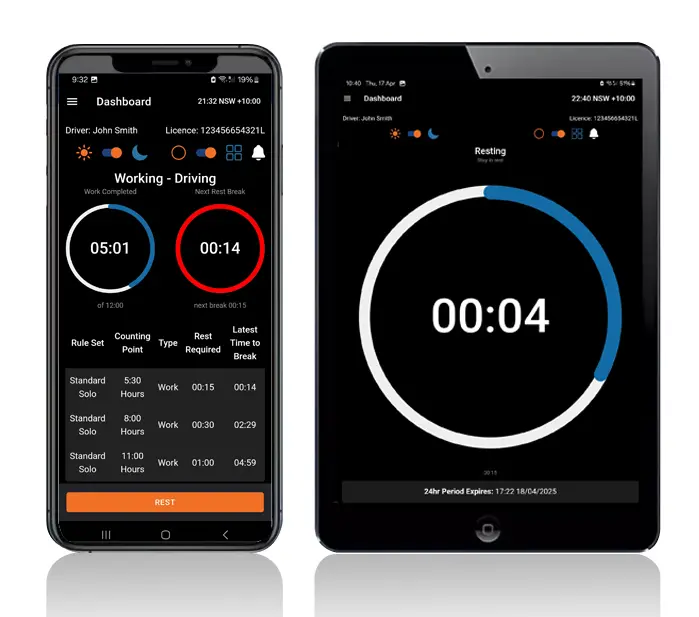
Logmaster app on a phone and tablet

Who It's Built For

Operators of every size are making the move, from small regional carriers to national fleets.
User Type
Benefit
Truck drivers
Easier logging and clear alerts
Transport operators
Real time visibility and compliance
Compliance managers
Reliable logs for inspections
Owner drivers
No paperwork and simple routines
Subcontractors
Easy switching between employers
The fleets that switch most smoothly are the ones that plan the people side as carefully as the software.

A Diary Drivers Have Helped Shape

Logmaster was shaped by feedback from drivers and is now used by more than 10,000 of them across 1,200+ businesses, including PFD Food Services, Cleanaway and Greyhound Australia. Its record keeper portal lets fleets enter written diary sheets too, so drivers still on paper can be checked for breaches during the changeover.
Book a Demo
Logmaster dashboard on a desktop screen

Hear from Our Users

Ray A.

First day with Logmaster was to my surprise was user friendly. Josh was very thorough in taking me through all the steps in setting up the Logmaster app. I would recommend Logmaster to all drivers regardless of age. Never have to worry about making a mistake as it tells you if you are. Great customer service after hours support is second to none.

Mike H.

Have started using Logmaster after trying 3 other models. I actually enjoy using it. Very easy to use and follow and the help if you need it is top notch by the developer. Does everything by the minute and works when no service is available. My system is customised for me and fits well with my system (I’m WA). Cost is on par with two of the other ones looked at.

Frequently Asked Questions

Ready to Plan Your Move From Paper?

Book a demo with your drivers in the room and let them see how Logmaster works before you switch.

Book a Demo

Download / Updating the app

Get it on Google PlayDownload on the App Store

Support

TRAINING CENTREFREQUENT QUESTIONSPRICING INFORMATION

Resources

Work & Rest RulesFor AuditorsFAQDownload Transport Compliance System BrochureArticles & MediaReseller ResourcesNHVR CertificationISO 27001 CertificationReleasesInvestorsBranded Device BackgroundsJoin Mailing List

Contact us

Level 1/63-73 Ann St, Surry Hills NSW 2010

New Enquiries
(02) 7228 6269
Support and Training
(02) 7228 6266
[email protected]LogmasterISO/IEC 27001 certified