Logmaster Logo
DriverRecord KeeperBusiness OwnerProductsIntegrationsTraining and GuidesAbout UsFind Providers

Fatigue Management for Queensland Heavy Vehicles

Queensland runs under the Heavy Vehicle National Law, with NHVR officers now on the roadside. Logmaster keeps your drivers' work and rest records accurate across every kilometre of a QLD run.
Ask For InfoBook a Demo
Man working on Logmaster app

TRUSTED BY MORE THAN 10,000 DRIVERS

logmaster supplychainpartners
HHTS logo
AfMA logo
logo
transport 1
HVIA logo

How Fatigue Management Works in Queensland

Queensland is one of the states that runs under the Heavy Vehicle National Law (HVNL), so the national work and rest limits apply here. Drivers of fatigue-regulated heavy vehicles need a work diary when they work 100km or more from base under Standard Hours, or at any distance under BFM, AFM, ACA-Fatigue or exemption hours.

Since 20 April 2024, the National Heavy Vehicle Regulator (NHVR) has delivered on-road compliance and enforcement in Queensland, taking over from the Department of Transport and Main Roads (TMR). NHVR Safety and Compliance Officers carry out roadside checks and programmed vehicle inspections. TMR still sells the written National Driver Work Diary.

Logmaster is an NHVR approved electronic work diary, so Queensland drivers can use it in place of the written diary.
Logmaster web portal open on a laptop

What Queensland Drivers Get

Long hauls between regional centres, early starts and stretches with no signal are part of the job in Queensland. Logmaster is built for that kind of work.
Minute-by-minute logging icon

Every minute counted

Logmaster records work and rest to the minute rather than in 15-minute blocks, so a long day on the Bruce or the Warrego doesn't cost you time to rounding.
Less paperwork icon

A diary that fills itself in

Guided screens take you through each entry, GPS fills in the suburb, and weekly log sheets go to the office without a trip to the depot.
Fatigue breach alert icon

Warnings before a breach

Rest break reminders and time-remaining alerts help you stop before you run out of hours, which matters when the next safe stop is a long way off.
Offline mode icon

Works out west

Out past coverage, the app keeps recording offline and syncs when you reach signal again, with nothing extra for you to do.
Drivers icon

One record for every truck

Drive the same prime mover all week or swap between vehicles, and your work and rest stay in a single diary.

For Queensland Operators and Record Keepers

An NHVR officer can ask for a driver's records at any intercept. Logmaster keeps those records complete and lets the office check them long before anyone else does.

Live hours across the fleet

See which drivers have hours left as entries sync in, from Brisbane depots to regional runs.

Records an officer can read

Electronic entries are clear and complete, which makes a roadside check quicker than flicking through a paper diary.

Potential breaches flagged early

Logmaster flags potential breaches so the office can act before a minor issue becomes a bigger one.

Livestock hours covered

Livestock exemption hours are built in alongside Standard Hours, BFM and AFM, so rural carriers can run their drivers under the right rules.

Paper drivers checked too

Paper workbook entry lets you check drivers still on the written diary for breaches in the same portal.

Phones, tablets and mounts

Drivers can use their own Android or Apple device, or Logmaster can supply tablets and truck mounts.

Electronic Work Diary vs Paper Logbook

How an electronic diary compares with paper for Queensland drivers.
Electronic Work Diary
Paper Logbook
One minute accuracy
Fifteen minute blocks
Automatic syncing
Manual entries
Easy to read and access
Handwriting varies
Real time operator visibility
No live oversight
Secure cloud storage
Can be lost or damaged
Faster audits and reporting
Time consuming
For long Queensland routes, the difference shows up at the roadside and in the office: entries are legible, complete and already synced.
Book a Demo

How It Works

Getting a Queensland fleet running on Logmaster takes a few steps.
Step 1

Pick your rule sets

Tell the Logmaster team which hours your drivers work under, from Standard Hours to livestock exemption hours.
Step 2

Install the app

Drivers download Logmaster on Android or Apple devices, or you order tablets and truck mounts.
Step 3

Start the shift

Drivers complete a fitness declaration and pre-start check, then log work and rest as they go.
Step 4

Sync from the road

Entries upload whenever there's signal, so the office sees regional runs without waiting for paperwork.
Step 5

Review in the portal

Record keepers check hours, alerts and records from one place.
Step 6

Keep records ready

Weekly log sheets arrive automatically, ready for an NHVR request or an audit.

Features at a Glance

1. Accurate one minute recording
2. Offline functionality for uninterrupted use
3. Live visibility for fleet managers
4. Fatigue reminders and breach alerts
5. Driver declarations and vehicle checks
6. Secure cloud storage
7. Multi company support for contractors
8. Fast export for audits and reporting
9. Fatigue rule sets including Standard Hours, BFM, AFM, WA plans and bus rules
Book a Demo
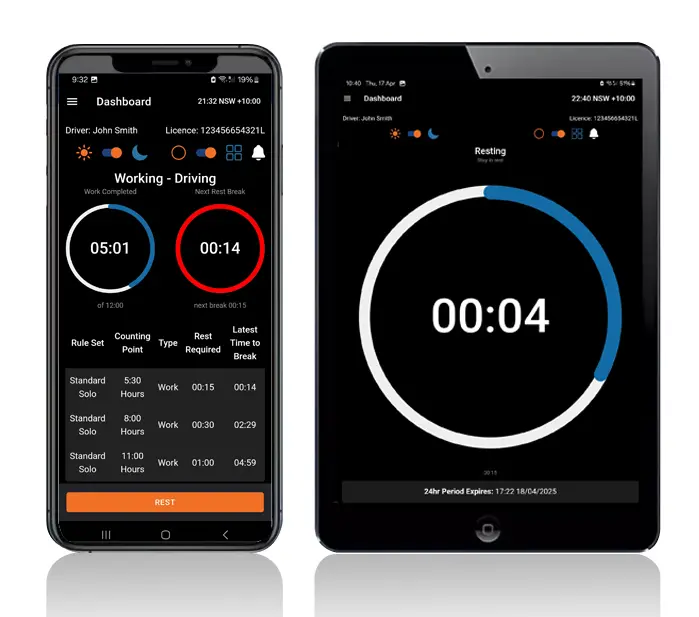
Logmaster app on a phone and tablet

Who It's Built For

From owner drivers in the bush to fleets running out of Brisbane, Logmaster suits the way Queensland transport works.
User Type
Benefit
Truck drivers
Easier logging and clear alerts
Transport operators
Real time visibility and compliance
Compliance managers
Reliable logs for inspections
Owner drivers
No paperwork and simple routines
Subcontractors
Easy switching between employers
Everyone works from the same live records, which is what an officer or auditor will want to see.

Why Queensland Fleets Choose Logmaster

Logmaster is used by more than 10,000 drivers and 1,200 businesses in the states and territories under the HVNL, including fleets such as PFD Food Services, Cleanaway and Greyhound Australia. It's ISO 27001 certified, and it handles the rule sets Queensland carriers rely on, including livestock exemption hours.
Book a Demo
Logmaster dashboard on a desktop screen

Hear from Our Users

Ray A.

First day with Logmaster was to my surprise was user friendly. Josh was very thorough in taking me through all the steps in setting up the Logmaster app. I would recommend Logmaster to all drivers regardless of age. Never have to worry about making a mistake as it tells you if you are. Great customer service after hours support is second to none.

Mike H.

Have started using Logmaster after trying 3 other models. I actually enjoy using it. Very easy to use and follow and the help if you need it is top notch by the developer. Does everything by the minute and works when no service is available. My system is customised for me and fits well with my system (I’m WA). Cost is on par with two of the other ones looked at.

Frequently Asked Questions

Make Queensland Runs Easier to Record

Book a demo and see how Logmaster keeps Queensland drivers inside their hours and gives the office records that are ready for any NHVR check.

Book a Demo

Download / Updating the app

Get it on Google PlayDownload on the App Store

Support

TRAINING CENTREFREQUENT QUESTIONSPRICING INFORMATION

Resources

Work & Rest RulesFor AuditorsFAQDownload Transport Compliance System BrochureArticles & MediaReseller ResourcesNHVR CertificationISO 27001 CertificationReleasesInvestorsBranded Device BackgroundsJoin Mailing List

Contact us

Level 1/63-73 Ann St, Surry Hills NSW 2010

New Enquiries
(02) 7228 6269
Support and Training
(02) 7228 6266
[email protected]LogmasterISO/IEC 27001 certified