Logmaster Logo
DriverRecord KeeperBusiness OwnerProductsIntegrationsTraining and GuidesAbout UsFind Providers

HVNL Changes 2026: A Checklist by Role

The amended HVNL took effect on 1 August 2026. Rather than another list of reforms, this page sorts the changes by who has to act on them, so each person in your business knows what to check.
Ask For InfoBook a Demo
Man working on Logmaster app

TRUSTED BY MORE THAN 10,000 DRIVERS

logmaster supplychainpartners
HHTS logo
AfMA logo
logo
transport 1
HVIA logo

How to Use This Checklist

Each item below links a change to the person most likely to own it. In a small business, one person may hold several of these roles.

The list sticks to changes confirmed by the NHVR and the NTC. Before you rewrite a procedure, check the detail against the NHVR's current guidance for your situation.

Work done entirely in WA or the NT isn't affected, because neither runs under the HVNL. Their vehicles still follow these changes when working in a participating state.
Logmaster web portal open on a laptop

Checklist for Drivers

Drivers handle the changes that appear on the road and in the diary.
Minute-by-minute logging icon

Know the Unfit to Drive duty

If you drive a heavy vehicle over 4.5 tonnes, you must not drive while unfit for any reason, not only fatigue.
Less paperwork icon

Relax the diary extras

On a written diary, the day of the week, daily totals and the Standard box are now optional.
Fatigue breach alert icon

ACH drivers: use the new box

Tick the Alternative Compliance Hours box and record your accreditation number in the table on page 29.
Offline mode icon

Keep your current diary

A written diary issued before August 2026 stays valid until it's full, and a lost diary that turns up no longer has to be returned.
Drivers icon

Confirm your hours table

If your operator has moved to ACA-Fatigue, ask which approved table you're working under.

Checklist for the Office

Schedulers, record keepers, managers and executives own the changes that live in procedures and systems.

Schedulers

Review rosters, deadlines and pay arrangements for anything that could cause or encourage a driver to keep going while unfit.

Record keepers

Update driver guidance for the simpler written diary. The three-year retention period for work diary records hasn't changed.

NHVAS holders

Note your expiry date. NHVAS accreditations run alongside the new scheme until they expire, and extensions of up to a year must be sought before expiry.

New fatigue applicants

Plan for General Safety Accreditation first, then ACA-Fatigue, since BFM and AFM are closed to new applicants.

Mass and access

General mass limits now match the old concessional limits. ACA-Mass isn't needed for those weights, but some notices and schemes still require it.

Executives

Revisit how you verify that safety resources and processes are used, and check your exposure under the revised penalty amounts.

Electronic Work Diary vs Paper Logbook

The written diary is simpler since August 2026, but the comparison with an electronic diary still looks like this.
Electronic Work Diary
Paper Logbook
One minute accuracy
Fifteen minute blocks
Automatic syncing
Manual entries
Easy to read and access
Handwriting varies
Real time operator visibility
No live oversight
Secure cloud storage
Can be lost or damaged
Faster audits and reporting
Time consuming
Drivers on an approved EWD never wrote daily totals by hand, so the paper simplifications change very little for them.
Book a Demo

How It Works

A practical order for working through the checklist as a business.
Step 1

Assign an owner

Give each item on the checklist to a named person, with a date to report back.
Step 2

Brief the drivers

Explain the Unfit to Drive duty and the written diary changes at a toolbox talk or induction.
Step 3

Check rosters and contracts

Look for schedules or clauses that reward finishing a run regardless of fitness or fatigue.
Step 4

Diarise accreditation dates

Record NHVAS and BFM or AFM expiry dates and decide on a path well ahead of each one.
Step 5

Update your documents

Bring procedures, training material and induction packs in line with the amended law.
Step 6

Keep evidence

Record what you changed, when and why, so you can show the steps taken.

Features at a Glance

1. Accurate one minute recording
2. Offline functionality for uninterrupted use
3. Live visibility for fleet managers
4. Fatigue reminders and breach alerts
5. Driver declarations and vehicle checks
6. Secure cloud storage
7. Multi company support for contractors
8. Fast export for audits and reporting
9. Fatigue rule sets including Standard Hours, BFM, AFM, WA plans and bus rules
Book a Demo
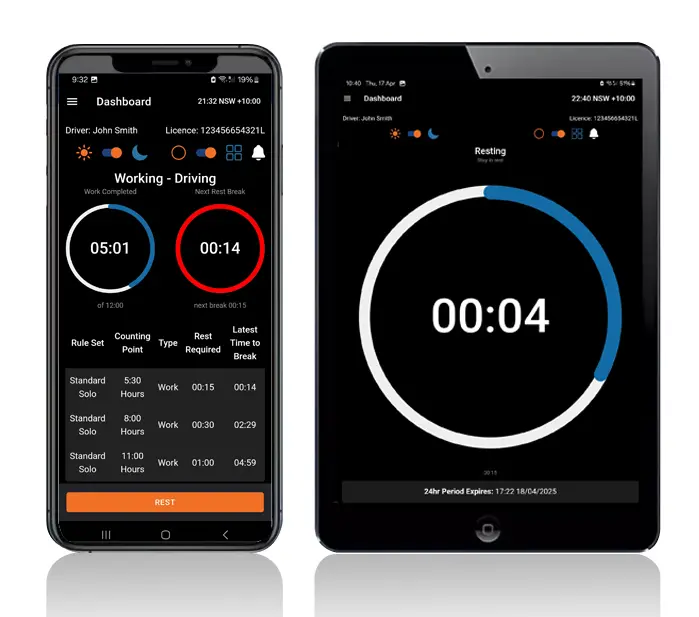
Logmaster app on a phone and tablet

Who It's Built For

The 2026 changes landed on different desks in the same business.
User Type
Benefit
Truck drivers
Easier logging and clear alerts
Transport operators
Real time visibility and compliance
Compliance managers
Reliable logs for inspections
Owner drivers
No paperwork and simple routines
Subcontractors
Easy switching between employers
Logmaster gives drivers, the office and owners one shared hours record while procedures change around it.

Logmaster and the 2026 Checklist

Logmaster records each change of activity to the minute and sends weekly log sheets to the record keeper, so the written diary simplifications don't alter a driver's routine in the app. A fitness declaration at the start of each shift gives drivers a recorded moment to confirm they're fit. Operators moving to ACA-Fatigue should contact Logmaster when they apply, so their approved hours can be built, tested and put to the NHVR for addition to the EWD.
Book a Demo
Logmaster dashboard on a desktop screen

Hear from Our Users

Ray A.

First day with Logmaster was to my surprise was user friendly. Josh was very thorough in taking me through all the steps in setting up the Logmaster app. I would recommend Logmaster to all drivers regardless of age. Never have to worry about making a mistake as it tells you if you are. Great customer service after hours support is second to none.

Mike H.

Have started using Logmaster after trying 3 other models. I actually enjoy using it. Very easy to use and follow and the help if you need it is top notch by the developer. Does everything by the minute and works when no service is available. My system is customised for me and fits well with my system (I’m WA). Cost is on par with two of the other ones looked at.

Frequently Asked Questions

Ready to Tick Off the Fatigue Items?

Book a demo and see how Logmaster keeps driver hours, fitness declarations and diary records in order under the amended HVNL.

Book a Demo

Download / Updating the app

Get it on Google PlayDownload on the App Store

Support

TRAINING CENTREFREQUENT QUESTIONSPRICING INFORMATION

Resources

Work & Rest RulesFor AuditorsFAQDownload Transport Compliance System BrochureArticles & MediaReseller ResourcesNHVR CertificationISO 27001 CertificationReleasesInvestorsBranded Device BackgroundsJoin Mailing List

Contact us

Level 1/63-73 Ann St, Surry Hills NSW 2010

New Enquiries
(02) 7228 6269
Support and Training
(02) 7228 6266
[email protected]LogmasterISO/IEC 27001 certified