Logmaster Logo
DriverRecord KeeperBusiness OwnerProductsIntegrationsTraining and GuidesAbout UsFind Providers

Building a Fatigue Risk Management System

A fatigue risk management system treats fatigue like any other safety risk: find it, rate it, control it and check the controls work. Driver hours data is one of the best inputs it has.
Ask For InfoBook a Demo
Man working on Logmaster app

TRUSTED BY MORE THAN 10,000 DRIVERS

logmaster supplychainpartners
HHTS logo
AfMA logo
logo
transport 1
HVIA logo

What a Fatigue Risk Management System Is

A fatigue risk management system is the part of a safety management system that deals with driver fatigue. It goes beyond staying inside the work and rest limits, looking at why fatigue happens in your operation and what you do about it.

Under the Heavy Vehicle Accreditation scheme, operators applying for ACA-Fatigue submit their Fatigue Risk Management System with their proposed hours, along with a safety case. General Safety Accreditation comes first, and it's achieved through an audit of the whole business's safety management system against the SMS Standard.

The SMS Standard has five system requirements: Leadership and Commitment, Risk Management, People, Assurance, Monitoring and Improvement, and Safety Systems. Fatigue risk sits across several of them.
Logmaster web portal open on a laptop

Identifying and Assessing Fatigue Risk

The NHVR's guidance treats hazard identification as ongoing rather than a one-off exercise.
Minute-by-minute logging icon

Look across the operation

Night work, long regional runs, early starts, loading delays and tight delivery windows all create fatigue risk.
Less paperwork icon

Ask the drivers

Drivers know which runs leave them worn out, and a reporting culture brings that knowledge to the surface.
Fatigue breach alert icon

Check the hours

Work diary records show where drivers run close to limits, take short rests or work long stretches.
Offline mode icon

Rate each risk

Assess how likely each hazard is and how severe the outcome could be, then decide which needs attention first.
Drivers icon

Keep a risk register

Record each risk, its rating and its controls so they can be reviewed and updated.

Controlling Risk and Checking It Works

Controls follow the hierarchy of controls, and reviews make sure they keep working as the business changes.

Design safer rosters

Build fatigue rules into rosters so the plan itself keeps drivers inside their limits.

Monitor compliance

The NHVR's guidance gives the example of using GPS or telematics with rosters to monitor compliance.

Remove unfit drivers

Drivers who are unfit are taken off duty, and systems prevent reprisal for self-reporting.

Add controls if needed

If a control doesn't reduce the risk enough, look for other or additional controls that will.

Review on change

Reviews are triggered by incidents, new information and changes to the work, as well as on a schedule.

Measure against the law

Reviews include how well the business complies with work and rest requirements.

Electronic Work Diary vs Paper Logbook

How electronic hours data compares with paper as an input to fatigue risk reviews.
Electronic Work Diary
Paper Logbook
One minute accuracy
Fifteen minute blocks
Automatic syncing
Manual entries
Easy to read and access
Handwriting varies
Real time operator visibility
No live oversight
Secure cloud storage
Can be lost or damaged
Faster audits and reporting
Time consuming
Paper diaries can feed a risk review, but someone has to transcribe them first. Electronic records are ready to analyse.
Book a Demo

How It Works

Using Logmaster's records inside your fatigue risk management system starts here.
Step 1

Map your fatigue hazards

List the runs, shifts and tasks where fatigue risk is highest.
Step 2

Set up driver plans

Give each driver the fatigue plan they work under in Logmaster.
Step 3

Collect hours as evidence

Every work and rest entry becomes data for your risk review.
Step 4

Watch for patterns

Look for drivers or runs that regularly come close to limits.
Step 5

Capture fitness concerns

Use fitness declarations and incident reports to record what drivers raise.
Step 6

Feed the review

Bring hours reports and breach history into each scheduled risk review.

Features at a Glance

1. Accurate one minute recording
2. Offline functionality for uninterrupted use
3. Live visibility for fleet managers
4. Fatigue reminders and breach alerts
5. Driver declarations and vehicle checks
6. Secure cloud storage
7. Multi company support for contractors
8. Fast export for audits and reporting
9. Fatigue rule sets including Standard Hours, BFM, AFM, WA plans and bus rules
Book a Demo
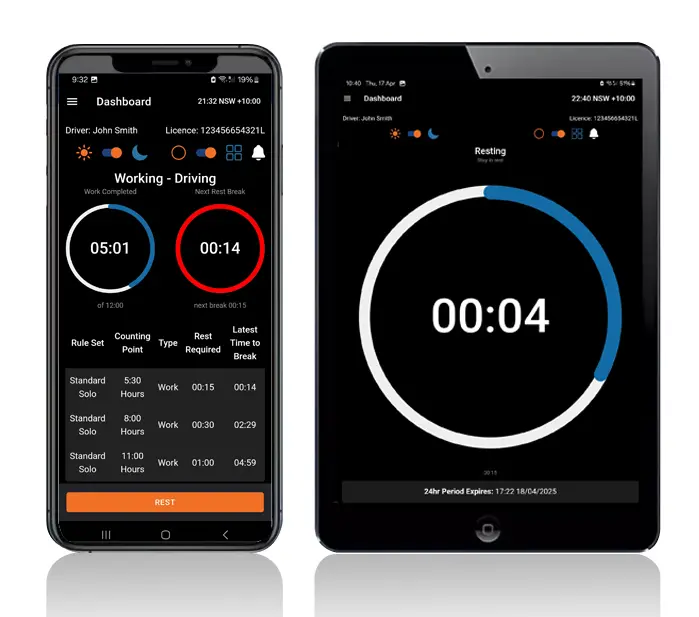
Logmaster app on a phone and tablet

Who It's Built For

Safety managers, schedulers and executives all use fatigue risk data, each for a different decision.
User Type
Benefit
Truck drivers
Easier logging and clear alerts
Transport operators
Real time visibility and compliance
Compliance managers
Reliable logs for inspections
Owner drivers
No paperwork and simple routines
Subcontractors
Easy switching between employers
Logmaster gives each of them the same hours data, viewed from their role.

Why Hours Data Belongs in Your Risk System

Logmaster records each driver's work and rest to the minute, flags potential breaches and exports compliance reports, giving a fatigue risk review real numbers to work with. Through Connected Fleets, Geotab or Microlise location data can sit alongside the hours. Logmaster supports your system, but the system itself is yours to design and run.
Book a Demo
Logmaster dashboard on a desktop screen

Hear from Our Users

Ray A.

First day with Logmaster was to my surprise was user friendly. Josh was very thorough in taking me through all the steps in setting up the Logmaster app. I would recommend Logmaster to all drivers regardless of age. Never have to worry about making a mistake as it tells you if you are. Great customer service after hours support is second to none.

Mike H.

Have started using Logmaster after trying 3 other models. I actually enjoy using it. Very easy to use and follow and the help if you need it is top notch by the developer. Does everything by the minute and works when no service is available. My system is customised for me and fits well with my system (I’m WA). Cost is on par with two of the other ones looked at.

Frequently Asked Questions

Ready to Put Real Hours Into Your Risk Reviews?

Book a demo and see how Logmaster's fatigue records feed the risk reviews your safety management system depends on.

Book a Demo

Download / Updating the app

Get it on Google PlayDownload on the App Store

Support

TRAINING CENTREFREQUENT QUESTIONSPRICING INFORMATION

Resources

Work & Rest RulesFor AuditorsFAQDownload Transport Compliance System BrochureArticles & MediaReseller ResourcesNHVR CertificationISO 27001 CertificationReleasesInvestorsBranded Device BackgroundsJoin Mailing List

Contact us

Level 1/63-73 Ann St, Surry Hills NSW 2010

New Enquiries
(02) 7228 6269
Support and Training
(02) 7228 6266
[email protected]LogmasterISO/IEC 27001 certified