Logmaster Logo
DriverRecord KeeperBusiness OwnerProductsIntegrationsTraining and GuidesAbout UsFind Providers

Supplementary Records When Your Work Diary Is Gone

A diary left in a burnt-out cab or blown off a tray doesn't stop the rules. Supplementary records keep a driver legal for a short time while a replacement is found.
Ask For InfoBook a Demo
Man working on Logmaster app

TRUSTED BY MORE THAN 10,000 DRIVERS

logmaster supplychainpartners
HHTS logo
AfMA logo
logo
transport 1
HVIA logo

What a Supplementary Record Is

A supplementary record is a stand-in work diary. NHVR guidance says drivers use one when their written diary is filled up, lost, stolen or destroyed and they can't buy a replacement straight away.

It can take any form, provided it's clear and legible and records everything the driver would normally put in a work diary. The NHVR publishes a template at nhvr.gov.au/supplementary.

It's a short-term fix. A driver stops using it once a replacement diary is bought, or after seven business days, whichever comes first.
Logmaster web portal open on a laptop

What the Driver Has to Do

NHVR guidance sets out a clear sequence for the driver.
Minute-by-minute logging icon

Tell the NHVR

Notify the NHVR within two business days of becoming aware that the diary is full, lost, stolen or destroyed.
Less paperwork icon

Record as normal

Write every work and rest change into the supplementary record with the same detail the diary asks for.
Fatigue breach alert icon

Watch the clock

Seven business days is the limit. Without a replacement by then, the driver stops work that needs a diary.
Offline mode icon

Carry 28 days

Supplementary records for the previous 28 days travel with the driver, along with the NHVR's acknowledgement email.
Drivers icon

Pass on a copy

The driver gives a copy of each supplementary daily record to their record keeper within 21 days.

When the Diary Is Electronic

The NHVR's EWD guide for record keepers covers faults and losses on electronic diaries too.

The driver reports it

A driver tells their record keeper within two business days if the EWD fails, fills up or goes missing.

The record keeper tells the NHVR

The record keeper notifies the NHVR within two business days of a fault, loss or theft.

Supplementary records for faults

If an EWD malfunctions, the record keeper directs the driver to use supplementary records.

The last 28 days

The driver is given the past 28 days of records that a replacement EWD doesn't already hold.

Back in working order

A faulty EWD has to be examined and fixed within the period the NHVR requires.

A replacement device

With an app-based EWD like Logmaster, a lost phone can be replaced and the driver signs in again, with earlier entries held in the cloud.

Electronic Work Diary vs Paper Logbook

How a written diary and an EWD compare when something goes wrong.
Electronic Work Diary
Paper Logbook
One minute accuracy
Fifteen minute blocks
Automatic syncing
Manual entries
Easy to read and access
Handwriting varies
Real time operator visibility
No live oversight
Secure cloud storage
Can be lost or damaged
Faster audits and reporting
Time consuming
A cloud-based EWD doesn't make the rules disappear, but it makes losing the history itself far less likely.
Book a Demo

How It Works

If a written diary goes missing, work through these steps.
Step 1

Stop and check

Make sure the diary really is gone, not under a seat or in another vehicle.
Step 2

Notify the NHVR

Report it within two business days and keep the acknowledgement email.
Step 3

Start a supplementary record

Use the NHVR template or any clear format that captures every required detail.
Step 4

Replace the diary

Buy a new written diary as soon as you can, or move onto an approved EWD.
Step 5

Cancel unused sheets

If the old diary turns up after a new one is issued, cancel its unused sheets with two parallel lines and the word CANCELLED.
Step 6

Hand over copies

Give your record keeper copies of the supplementary records within 21 days.

Features at a Glance

1. Accurate one minute recording
2. Offline functionality for uninterrupted use
3. Live visibility for fleet managers
4. Fatigue reminders and breach alerts
5. Driver declarations and vehicle checks
6. Secure cloud storage
7. Multi company support for contractors
8. Fast export for audits and reporting
9. Fatigue rule sets including Standard Hours, BFM, AFM, WA plans and bus rules
Book a Demo
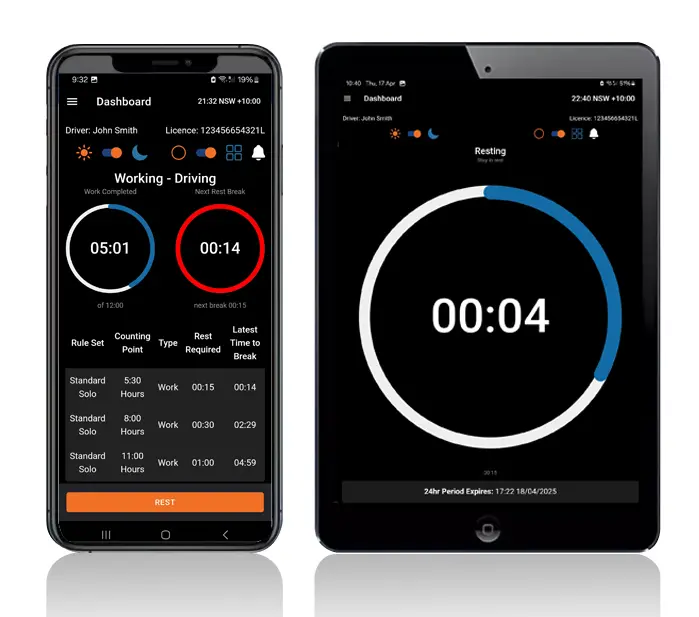
Logmaster app on a phone and tablet

Who It's Built For

Drivers, record keepers and operators each have a part when a diary is lost.
User Type
Benefit
Truck drivers
Easier logging and clear alerts
Transport operators
Real time visibility and compliance
Compliance managers
Reliable logs for inspections
Owner drivers
No paperwork and simple routines
Subcontractors
Easy switching between employers
Knowing the steps in advance turns a bad day into a short admin task.

Why a Cloud Diary Helps Here

Logmaster stores each driver's entries on the device and in the cloud, so a smashed or stolen phone doesn't take the history with it. The app runs on everyday Android and Apple phones, and the record keeper can see the last entries in the portal straight away.
Book a Demo
Logmaster dashboard on a desktop screen

Hear from Our Users

Ray A.

First day with Logmaster was to my surprise was user friendly. Josh was very thorough in taking me through all the steps in setting up the Logmaster app. I would recommend Logmaster to all drivers regardless of age. Never have to worry about making a mistake as it tells you if you are. Great customer service after hours support is second to none.

Mike H.

Have started using Logmaster after trying 3 other models. I actually enjoy using it. Very easy to use and follow and the help if you need it is top notch by the developer. Does everything by the minute and works when no service is available. My system is customised for me and fits well with my system (I’m WA). Cost is on par with two of the other ones looked at.

Frequently Asked Questions

Ready to Stop Worrying About Lost Diaries?

Book a demo and see how Logmaster keeps a driver's records safe in the cloud, even when the phone isn't.

Book a Demo

Download / Updating the app

Get it on Google PlayDownload on the App Store

Support

TRAINING CENTREFREQUENT QUESTIONSPRICING INFORMATION

Resources

Work & Rest RulesFor AuditorsFAQDownload Transport Compliance System BrochureArticles & MediaReseller ResourcesNHVR CertificationISO 27001 CertificationReleasesInvestorsBranded Device BackgroundsJoin Mailing List

Contact us

Level 1/63-73 Ann St, Surry Hills NSW 2010

New Enquiries
(02) 7228 6269
Support and Training
(02) 7228 6266
[email protected]LogmasterISO/IEC 27001 certified