NEW ENQUIRIES(02) 7228 6269SUPPORT AND TRAINING(02) 7228 6266
Logmaster Logo
DriverRecord KeeperBusiness OwnerProductsIntegrationsTraining and GuidesAbout UsFind Providers

Truck driver hours calculator: your hours, counted for you

Leave the arithmetic out of the cab. Logmaster works out your hours against your rule set as you log, and keeps a tidy record of each shift.
Ask For InfoBook a Demo
Man working on Logmaster app

TRUSTED BY MORE THAN 10,000 DRIVERS

logmaster supplychainpartners
HHTS logo
AfMA logo
logo
transport 1
HVIA logo

What Is a Truck Driver Hours Calculator?

A truck driver hours calculator tells you how much legal work time you have left today and across the week, based on the fatigue rules you work under.

For a solo truck driver on Standard Hours, the big numbers are 12 hours' work in any 24 and 72 hours in any 7 days, with at least 24 continuous hours of stationary rest in any 7 days. Shorter windows add the 15, 30 and 60-minute breaks.

Logmaster works it out from your diary as you go. It's an NHVR approved electronic work diary that shows your time remaining and warns you before a breach, so there's nothing to calculate separately.
Logmaster web portal open on a laptop

Hours Counted from the Cab

Logmaster takes the headache out of truck driver hours. Log as you go and the app keeps track of your limits, so you can focus on the road.
Minute-by-minute logging icon

Every minute counts

Every quarter-hour block on paper can cost you a few minutes. Logmaster logs the true minute, so the time left against your daily and weekly limits reflects what you actually worked.
Less paperwork icon

Paperwork, sorted

Each entry is a guided tap instead of a line drawn on a grid. Log sheets go to your record keeper weekly, so there's nothing to post or drop in.
Fatigue breach alert icon

Stay inside your limits

You'll get a reminder before your next break falls due, and your remaining hours stay visible all shift. That keeps the daily and weekly limits in front of you.
Offline mode icon

Offline when you need it

Long-haul runs often lose coverage for hours at a time. Logmaster keeps logging through it, saves entries on the device and uploads them once you're in range, with nothing to type again.
Drivers icon

Designed around truck work

Your location is captured when you log a work or rest event and at no other time. Logmaster doesn't follow the truck between entries or share your data without permission.

Hours Visibility for the Office

Dispatch needs to know who can legally take the next load. Logmaster shows each driver's status and upcoming limits live.

Who's got hours for the load

Check today's hours across the fleet as entries come in, and shift loads before a driver hits a limit.

Everything in one portal

Paper forms give way to digital ones, and a custom form builder covers anything particular to your trucks, all stored and searchable.

Breaches caught early

Alerts appear while the truck is still on the road, so a problem is sorted the same day.

Plan with confidence

Hand out loads knowing how many hours each driver has left, so trucks aren't stood down mid-run.

Less time training

The screens are plain and help is available, so new drivers start logging without fuss.

Your phone, approved

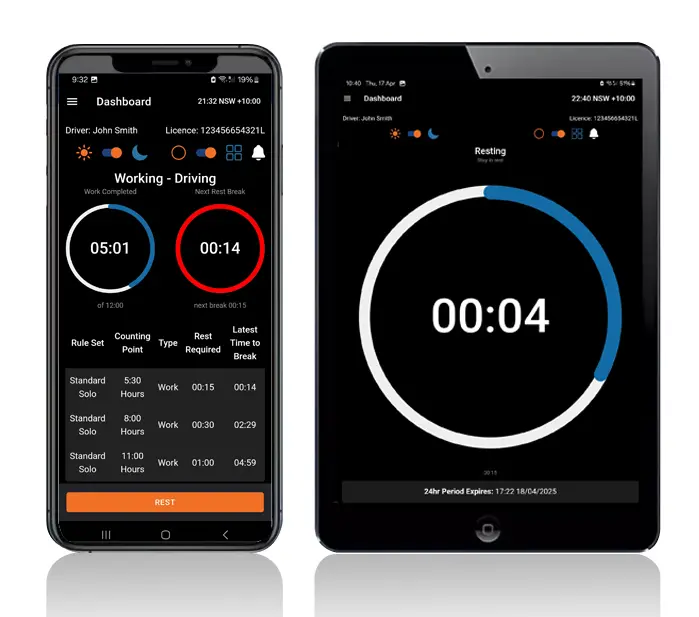
Truck drivers can log on their own Apple or Android phone or tablet, with no box to install behind the dash.

Electronic Work Diary vs Paper Logbook

Paper sums versus app totals.
Electronic Work Diary
Paper Logbook
One minute accuracy
Fifteen minute blocks
Automatic syncing
Manual entries
Easy to read and access
Handwriting varies
Real time operator visibility
No live oversight
Secure cloud storage
Can be lost or damaged
Faster audits and reporting
Time consuming
With paper, every total is your own sum. The app does it for you.
Book a Demo

From Install to End of Shift

Getting started only takes a few steps.
Step 1

Set up the app

Download the app to your phone or tablet and enter your details to get set up.
Step 2

Start the day right

Run through the truck pre-start and your fitness declaration on the device, so the shift starts with the paperwork already done.
Step 3

Record your shift

Each activity change you log is counted against your fatigue plan straight away.
Step 4

Stays in sync

Entries wait on the device when the truck is out of range, then upload to the cloud once there's a connection, keeping the record whole.
Step 5

Record keeper portal

Compliance staff see every driver's hours live, without waiting for diaries to come in.
Step 6

Export logs for audits

Pull a report on any truck driver's hours for an audit or an internal check.

Inside the App and Portal

1. Accurate one minute recording
2. Offline functionality for uninterrupted use
3. Live visibility for fleet managers
4. Fatigue reminders and breach alerts
5. Driver declarations and vehicle checks
6. Secure cloud storage
7. Multi company support for contractors
8. Fast export for audits and reporting
9. Fatigue rule sets including Standard Hours, BFM, AFM, WA plans and bus rules
Book a Demo
Logmaster app on a phone and tablet

Who It Helps

Owner drivers, fleet schedulers and compliance managers each get a view that fits.
User Type
Benefit
Truck drivers
Easier logging and clear alerts
Transport operators
Real time visibility and compliance
Compliance managers
Reliable logs for inspections
Owner drivers
No paperwork and simple routines
Subcontractors
Easy switching between employers
Drivers and the office looking at the same hours means fewer crossed wires.

Why Truck Drivers Choose Logmaster

Truck drivers at more than 1,200 businesses count their hours with Logmaster, from fleets such as PFD Food Services and Cleanaway to owner drivers with one rig. More than 10,000 drivers use the app in total, and it reaches operators through over 80 channel partners. The core need doesn't change with fleet size: an accurate tally of work and rest, kept with little effort.
Book a Demo
Logmaster dashboard on a desktop screen

What Our Customers Say

Ray A.

First day with Logmaster was to my surprise was user friendly. Josh was very thorough in taking me through all the steps in setting up the Logmaster app. I would recommend Logmaster to all drivers regardless of age. Never have to worry about making a mistake as it tells you if you are. Great customer service after hours support is second to none.

Mike H.

Have started using Logmaster after trying 3 other models. I actually enjoy using it. Very easy to use and follow and the help if you need it is top notch by the developer. Does everything by the minute and works when no service is available. My system is customised for me and fits well with my system (I’m WA). Cost is on par with two of the other ones looked at.

Frequently Asked Questions

Make the Switch Today

Hand the counting to an NHVR approved EWD that keeps your daily and weekly limits in view as you log. Logmaster works without signal, supports Standard Hours and existing BFM or AFM accreditations, and keeps the office up to date.

Book a Demo

Download / Updating the app

Get it on Google PlayDownload on the App Store

Support

TRAINING CENTREFREQUENT QUESTIONSPRICING INFORMATION

Resources

Work & Rest RulesFor AuditorsFAQDownload Transport Compliance System BrochureArticles & MediaReseller ResourcesNHVR CertificationISO 27001 CertificationReleasesInvestorsBranded Device BackgroundsJoin Mailing List

Contact us

Level 1/63-73 Ann St, Surry Hills NSW 2010

New Enquiries
(02) 7228 6269
Support and Training
(02) 7228 6266
[email protected]LogmasterISO/IEC 27001 certified